Your next game starts here
Little League lineup generator
Plan who bats, who fields, and who sits each inning. Try the manual builder below, or create an account to generate a lineup using your team’s rules.
Build Your LineupFree preview · No signup · Up to 5 innings
Build your lineup
Start with your roster, or try sample players to see how it works.
Want to try it first?
Start with 12 sample players. Choose their positions and try the print preview.
Roster
Add your first player above.
This preview stays in this tab. Print before leaving. For saved teams, longer games, and automatic rule checks, create an account.
Make it fit your game
A batting order and a plan for every inning
Start with your division’s current rules, including local minimum-play requirements. A continuous batting order includes everyone on the game roster, even while they sit on defense. Pitching eligibility needs a separate check using recorded outings and the rules for your game.
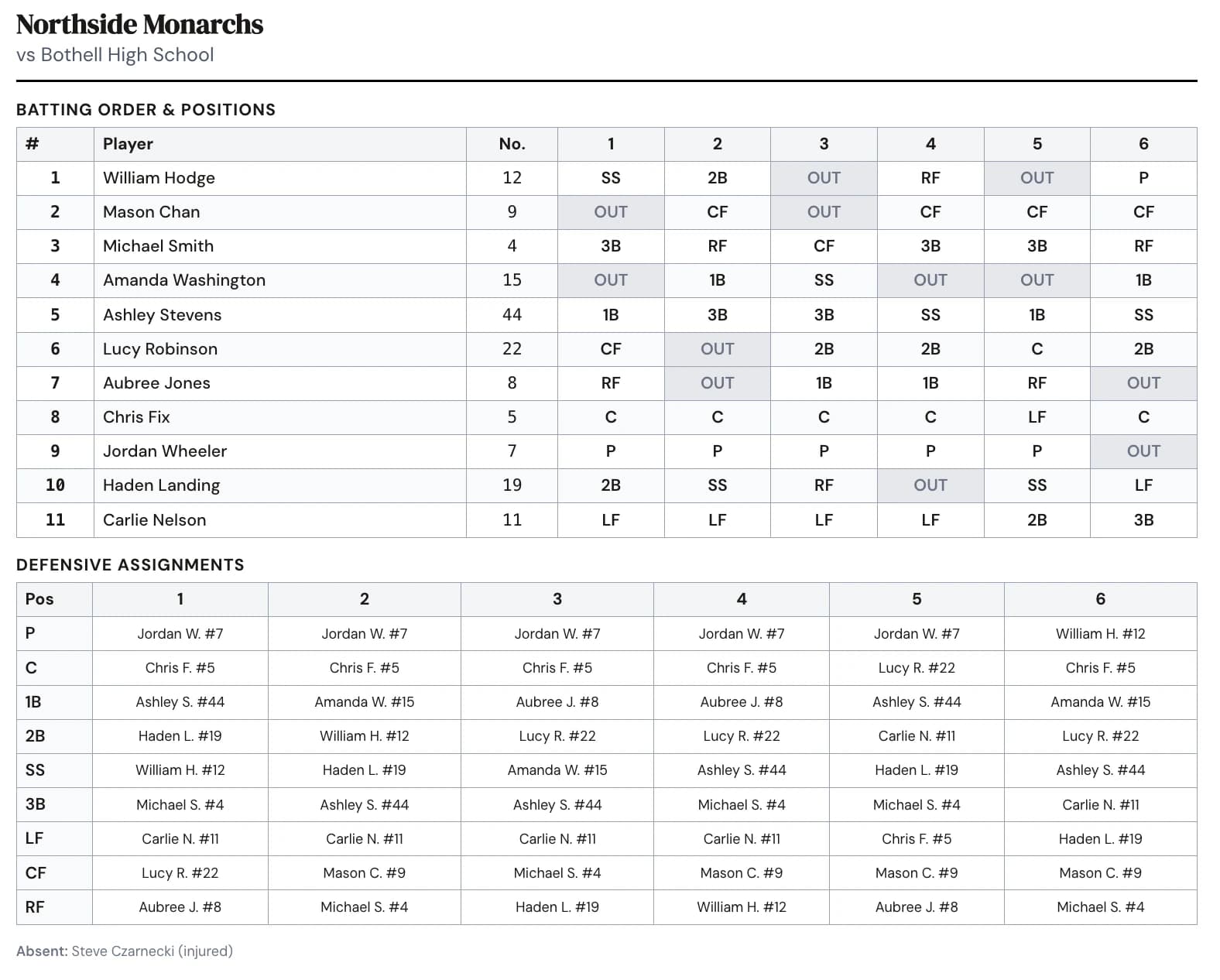
Read down an inning to check every field position. Read across a player’s row to check their assignments and bench turns. Review the card with your assistant coach before the game.
Planning a fall roster? Explore our fall ball lineup guide.
Little League rules that shape the lineup
Little League sets rules by division and league age, and your league may add local rules. These are the ones coaches plan around most in baseball.
Minimum play
Every player in Minors through Juniors plays at least 6 defensive outs and gets 1 at-bat. A continuous batting order means everyone on the roster bats.
Pitch counts and rest days
Daily maximums run from 50 pitches at ages 7 to 8 up to 95 in Intermediate, Juniors and Seniors (85 in Majors), with rest from none (up to 20 pitches) to 4 days (66 or more) for league ages 14 and under.
Try the pitch count calculator →Pitcher and catcher limits
A catcher who has caught 4 or more innings can’t pitch that day, and a pitcher who has thrown 41 or more pitches can’t catch that day.
When you’re planning the whole season
Keep your roster ready for the next game.
Save your team once. In the full app, generate lineups using your enabled rules, review pitching availability from recorded outings, and use the Fairness Summary to review playing time.
Before you make your lineup
What can I do here without signing up?
Add up to 20 players, set a batting order, and manually assign 9 field positions for 3 to 5 innings. Print the lineup card and a first-inning field diagram. Your work stays in this tab and is lost when you reload or leave; print it before closing the page.
Does selecting Little League include my local rules?
The full app has rule-set templates you can review and customize. Add your league’s local requirements separately. Auto-generate uses the rules you turn on and shows conflicts for you to review. This public preview doesn’t generate lineups or check compliance.
What does a free account include?
Set up your team, roster, and rules without a credit card. Your first 3 saved lineups are free per account, shared across your teams, with no trial deadline. The full builder supports longer games and auto-generation. See pricing for the current plans and included features.
Can I use this on my phone?
Yes. Add players in the Roster tab, then switch to Field. Tap a field position to choose a player; dragging is optional. Use the arrow buttons to move players in the batting order. Open the print preview to print or save a PDF using your browser’s print options.