
The prep work's done. Go coach.
Build the lineup, check pitcher eligibility, and see who's sat before you walk into the dugout.
Prefer the app? Take a look
3 lineups free
No card and no time limit.
One team, shared with your coaches
Invite your staff at no extra cost.
One last look at the lineup
The lineup looks ready. One player sits twice in a row.
Amanda is out in innings 4 and 5. With your bench rule on, the builder flags it. You choose how to adjust.
Your rules. Your call.
A second set of eyes on the details, while the coaching stays with you.
There it is. Innings 4 and 5.
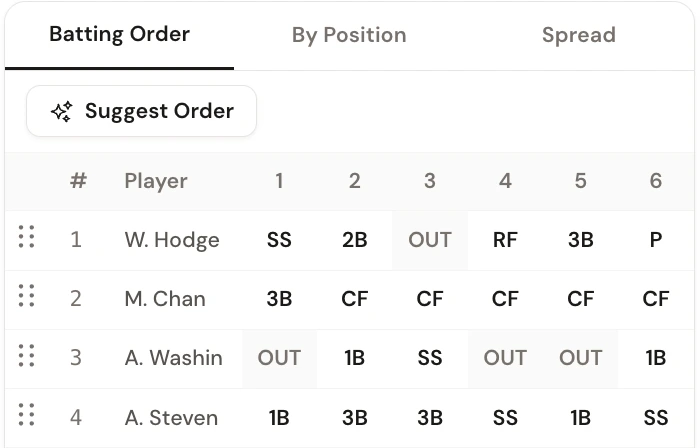
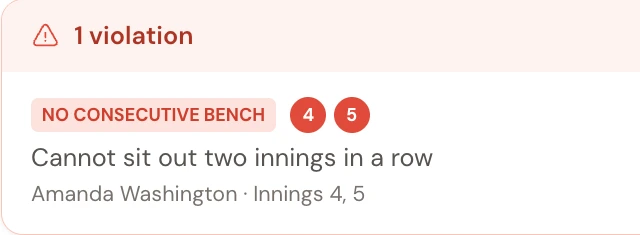
Before the first pitch
The details that usually live in three different places.
Your league's rules stay in the lineup.
Turn on minimum play, bench limits, and infield requirements once. The builder flags a conflict while there's still time to fix it.
Try the rules builderKnow who can pitch on Saturday.
Log the pitches, including outings for another team. Rest days calculate automatically, so you can see who's available for the next game.
Check a pitch countAcross the season
A season's worth of playing time, in one view.
See who's played and who's sat before the next lineup. Use the totals alongside attendance, injuries, and your coaching judgment.
How it works
Roster to lineup card in about 5 minutes.
No setup call. No credit card.
- 1
Bring your roster
Paste a list, import a GameChanger roster or CSV, or add players by hand.
- 2
Set the guardrails
Pick your league rules and pitching limits once.
- 3
Hand over the card
Build the lineup, check it, print it, and head to the field.
And yes, it prints.
Batting order, jersey numbers, and every inning's assignments. A copy for the dugout, without retyping the lineup.
The example shown is demo output before the bench adjustment.
From the dugout
Three coaches. Three different reasons to keep it open.
“I can easily build my lineup, track player history, record game notes, pitch counts and pitcher availability all in one place.”
“We just signed all of our coaches up for this so we can track pitch counts across the league. Finally one place to see who threw what and when they can pitch again.”
“This app makes tracking my players easy! I don't coach to crunch numbers, and now I don't have to!”
A few things coaches ask first.
Is setup really free?
Yes. Add your team, roster, schedule, and rules without a credit card. Your first 3 saved lineups are free, shared across your account, with no trial deadline. Creating another team does not reset the allowance.
Does it work for softball?
Yes. Who’s on Second works for baseball and softball at every level, including Little League, rec, travel, high school, and adult leagues.
Can I use it from the dugout?
Use the web app on your phone, tablet, or laptop, or the native iPhone and Android apps. You’ll need an internet connection to sync changes. Print a lineup before heading somewhere with poor reception.
What does auto-generate do?
It builds a complete lineup around the rules you turned on, then shows any conflicts before you save or print it.
Can assistant coaches use the same team?
Yes. Invite assistant coaches, scorekeepers, and parents at no extra cost. Their access matches their team role. If you’re joining an existing team, use your coach’s invitation or join link instead of creating another team.
What happens if I stop subscribing?
Your team, games, and lineup history stay put. You can still view your data and pick back up next season.
Can parents see the lineup?
Yes. Parents get read-only access to their linked player’s position assignments, innings played, and pitch counts. They can also report pitching outings for another team, without changing the coach’s lineup.
How are pitch counts tracked across teams?
Each team tracks its own pitch counts. Parents can report external pitching outings for their player, and coaches can log them too. The rest day calculator uses those recorded outings alongside your team’s games.
Does it work for summer and fall ball?
Yes. Spring, summer, All-Star, and fall ball use the same configurable rules, lineup builder, pitch count tracking, and fairness tools. Your lineup history stays available when the next season starts.
I already use a spreadsheet. Why switch?
The baseball and softball lineup maker brings your roster, pitching rest days, rule checks, and season-long playing time into one place. Drag players onto the field or auto-generate a lineup, review it, and print the lineup card without retyping it.
I’m not very tech-savvy. Is this easy to use?
Start with your roster, turn on the rules your team uses, then drag players onto positions or try auto-generate. Your first 3 saved lineups are free, so you can try the workflow before subscribing.
Can I import my existing roster?
Yes. Import a GameChanger roster export, upload a CSV, or paste names from a spreadsheet or group text. You can also add players by hand.
Bring one less thing to the field.
Your roster and rules are free to set up. Build 3 lineups before you pay anything.
No ads. No data selling. Ever.