Build fair lineups in 2 minutesThe better way to
build a lineup.
Less spreadsheet, more coaching. Track pitch counts, build rule-compliant lineups with drag-and-drop, and keep playing time balanced all season.
3 free lineups. No credit card needed.
The lineup app for baseball & softball coaches at every level — Little League, travel ball, rec leagues, and beyond.
Sound familiar?
Every coach has been there. Here's how it changes.
Your league's rules, built in
Toggle on minimum play, consecutive bench limits, mandatory infield innings, and more. Every rule is configurable per team — no hardcoded assumptions. The lineup builder warns you in real time when a rule is about to be violated.
Try the free rules builder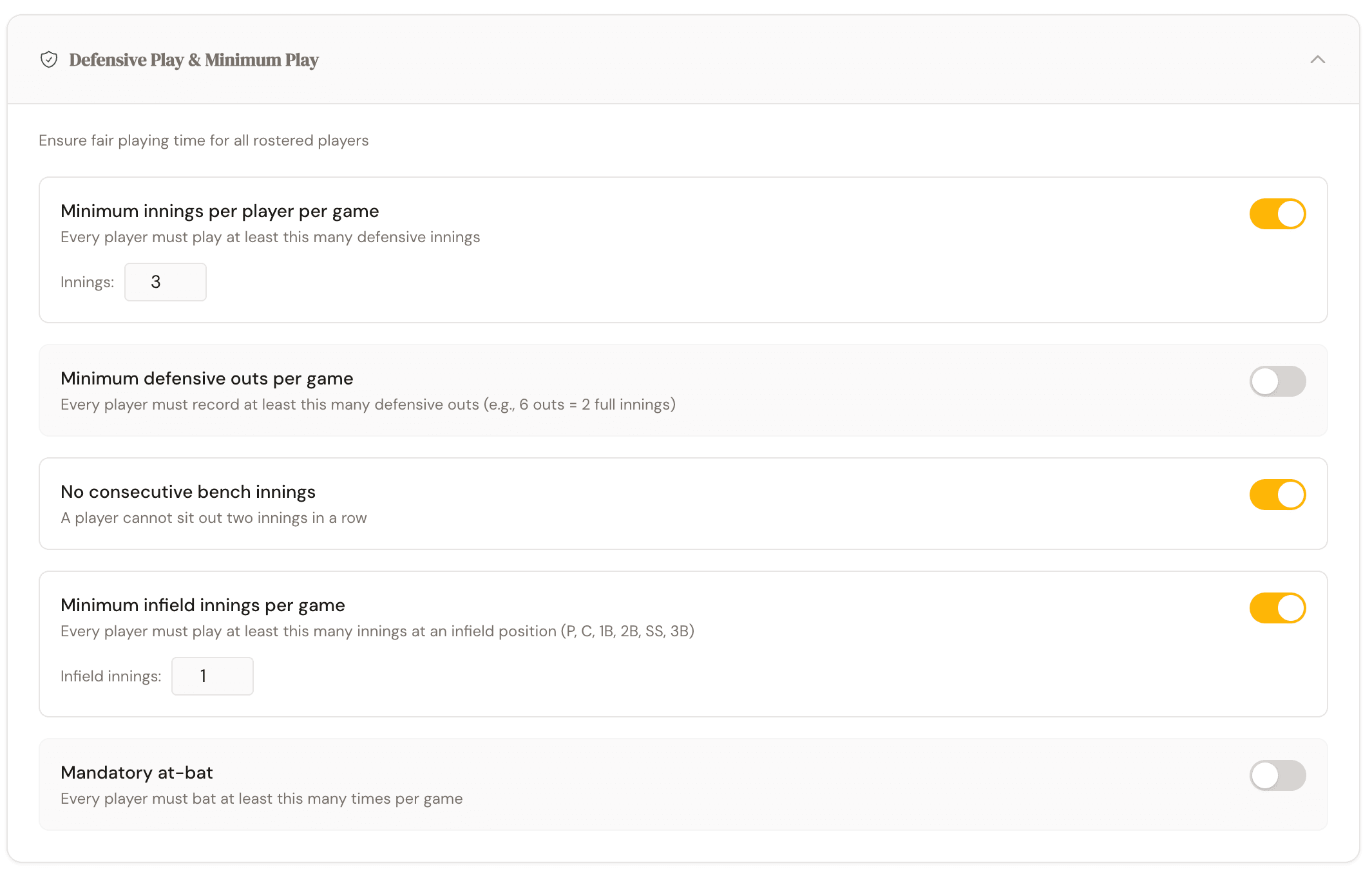
Click to enlarge
Click to enlarge
Pitch counts & rest days, automated
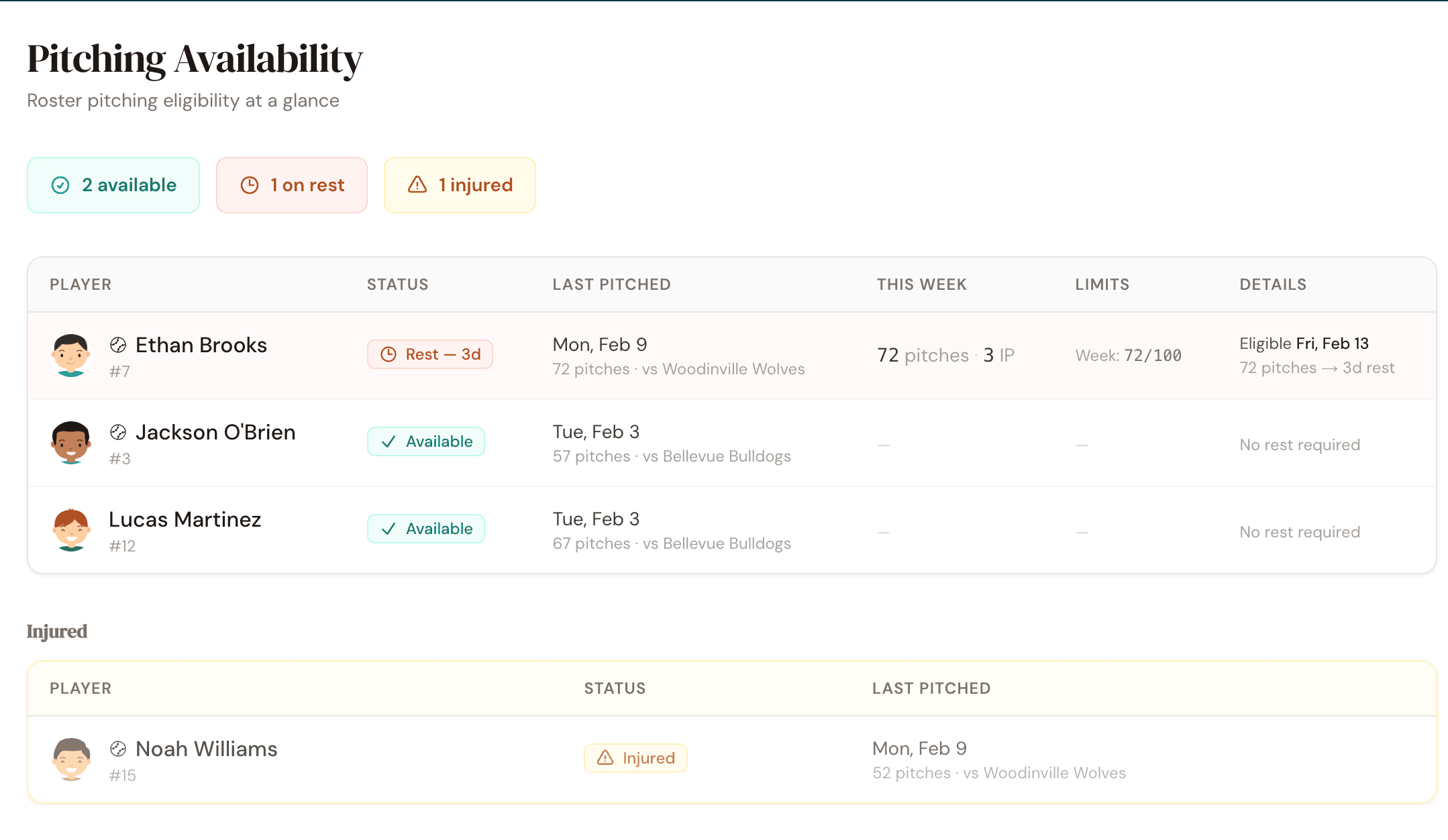
Log pitch counts after each game and rest days calculate automatically. See at a glance who's eligible to pitch, who's on mandatory rest, and who's approaching their limit — even across multiple teams. Ineligible pitchers are flagged before you make the lineup.
Try our free rest day calculatorSeason-long fairness, one dashboard
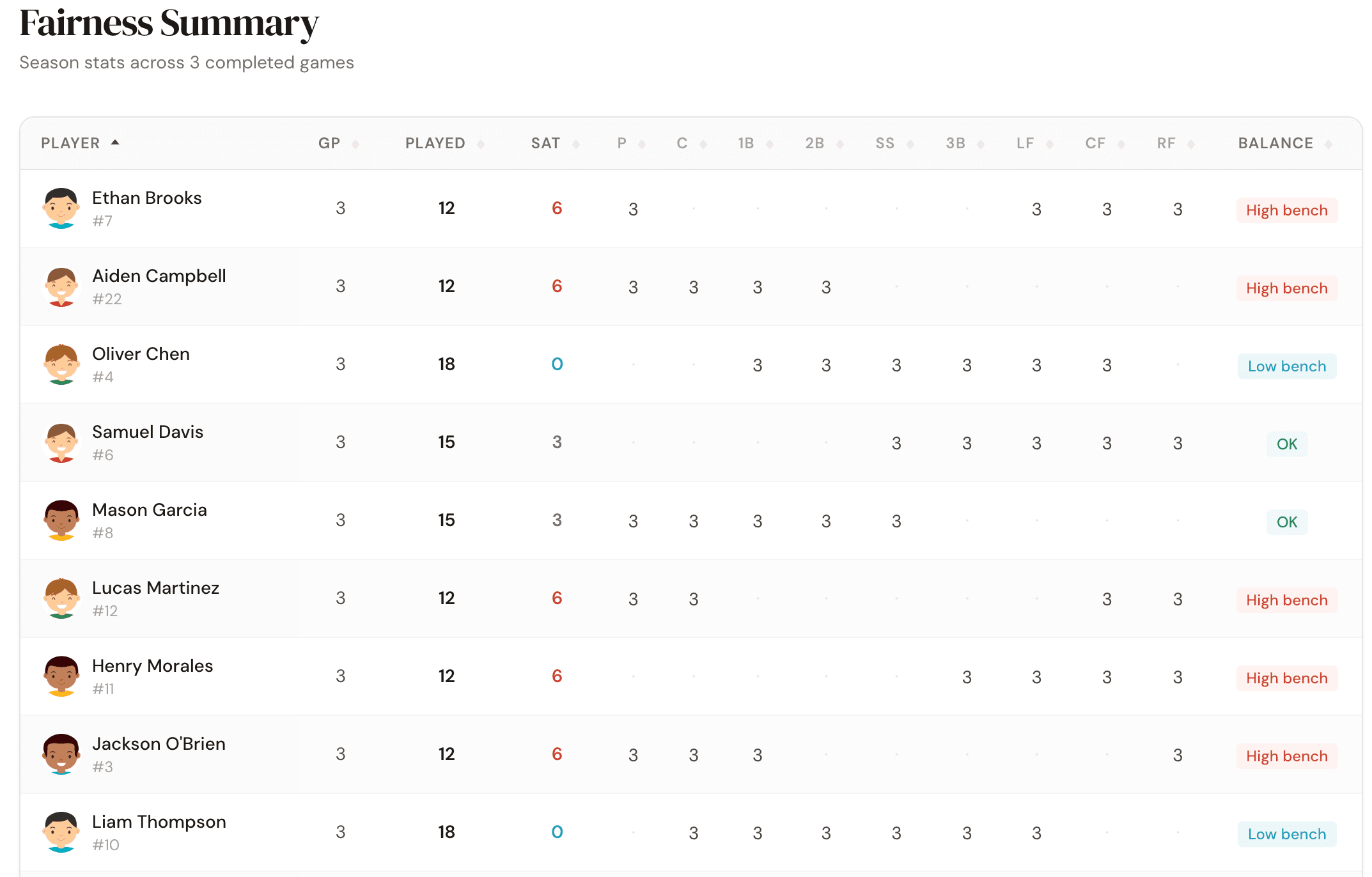
Season-level fairness dashboard shows who played where and how much. Spot imbalances instantly so every player gets a fair shake. Parents get read-only access to their player's stats — transparency builds trust.
Click to enlarge
Get started in minutes
How it works
Add your roster
Enter your players, jersey numbers, and preferred positions. Takes about 2 minutes for a full team.
Set your rules
Toggle on the rules your league enforces — minimum play, bench limits, pitching restrictions. Or skip and add them later.
Build your lineup
Drag players onto the diamond or let auto-generate do it for you. Print the lineup card and head to the field.
From the dugout
What coaches are saying
As a head coach of two teams, this app is a lifesaver. Gone are the days of trying to keep track of batting order, playing time, and players position strengths in a homebrew spreadsheet. I can easily build my lineup, track player history, record game notes, pitch counts and pitcher availability all in one place. Highly recommended for anyone who wants to improve their coaching at game time or just likes to stay organized. Development support is spot on too with often same day implementation of recommended improvements.
We just signed all of our coaches up for this so we can track pitch counts across the league. Finally one place to see who threw what and when they can pitch again.
I spent more time fighting my spreadsheet last season than I did running practice. Entered my roster in here in like ten minutes and I was done.
I got tired of texting my assistant coach the night before every game asking who pitched last weekend. Now we both just open the app and it's all right there.
Frequently asked questions
What sports does this work for?
Baseball and softball at any level — Little League, travel ball, rec leagues, high school, and adult leagues. The rules engine is fully configurable per team.
How does the free trial work?
Your first 3 lineups are free with no time limit and no credit card required. Setup is always free: teams, players, schedules, and rules. After 3 lineups, subscribe to keep building new ones. Your data stays safe either way.
Can parents see the lineup?
Yes. Parents get read-only access scoped to their linked player. They can see their child's position assignments, innings played, and pitch counts — but can't modify anything.
How are pitch counts tracked across teams?
Each team tracks their own pitch counts. For players on multiple teams, parents can report external pitch counts directly — so coaches don't have to chase down numbers from other teams. The rest day calculator considers every game automatically, not just yours.
What does "auto-generate" actually do?
It builds a complete lineup that satisfies all your enabled rules — minimum play, bench limits, infield requirements, pitching restrictions — while optimizing for fairness across the season.
Can I use this on my phone at the field?
Absolutely. The app is fully responsive and works on phones, tablets, and laptops. Add it to your home screen for a native app feel.
I already use a spreadsheet — why switch?
Spreadsheets don't track fairness across a season, calculate rest days automatically, or warn you when a player can't pitch. Who's on Second does all of that plus generates printable lineup cards. Most coaches switch in under 5 minutes — just enter your roster and go.
I'm not very tech-savvy. Is this easy to use?
If you can use a phone, you can use Who's on Second. Drag a player's name onto a position — that's it. No formulas, no complicated menus. Try the demo with zero commitment to see for yourself.
What happens to my data if I cancel?
Your rosters, games, and lineup history stay safe. You can still view everything, manage your schedule, and enter pitch counts. Creating or editing lineups requires a subscription. We never delete your data.
Can I import my existing roster?
You can add players manually in about 2 minutes for a full team. Bulk import from a spreadsheet is coming soon.
Do assistant coaches need their own subscription?
No. Your subscription covers the entire team. Invite unlimited assistant coaches, scorekeepers, and parents at no extra cost.
No ads. No data selling. Ever.
You pay a fair price, we build a great product. Your team's data belongs to you — we will never monetize it with ads or sell it to third parties.
Stop juggling spreadsheets
Build your first lineup in under 5 minutes. Import your roster, set your rules, drag players onto the diamond.